
There are two main workflows for collecting and marking Group work, each with its own advantages and disadvantages. To decide which approach best suits your assessment, please see: How do I set up and mark a Group work Assessment?
This article describes Workflow 2: Coursework activity (Individual submission)
Overview
In this workflow:
- Group mode must be turned off to allow for individualised grades and feedback. Note: this is the default setting for all deployed dropboxes.
- If a file submission is required, each student must submit their own file. Typically, this will be the same version of the group work for all members of the group (for example, the same set of PowerPoint slides).
- Each submission must be marked individually.
If your module includes a Group assessment component in Banner a corresponding Group Coursework activity will be automatically created in the ‘Assessment’ section of your Moodle module.
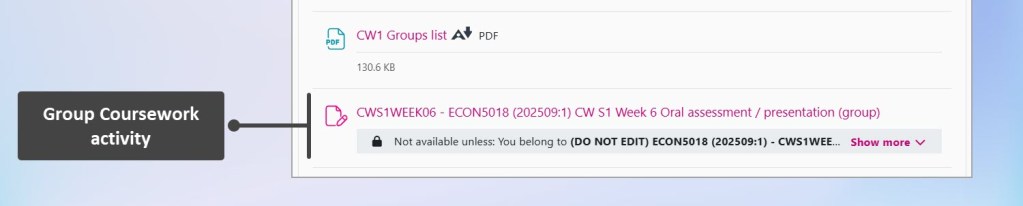
Settings
Please review and amend the following settings as required: Which dropbox settings do I need to check in Coursework dropboxes?
- The Coursework activity must have Group submissions set to ‘No’ to support individual grading and feedback.
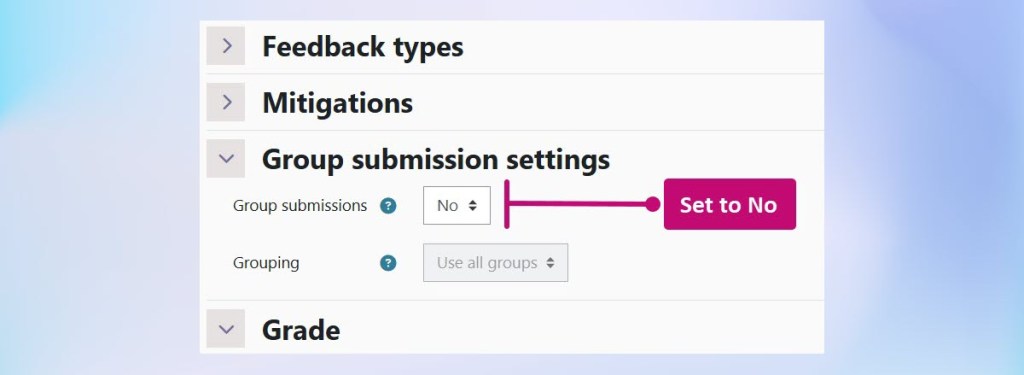
- If a file submission is required, there is no change needed as the default settings are for File submission.
- If no file submission is required, untick File submission and tick Event marks input instead. You will also need to ensure an Event date is set before you will be able to add marks and feedback. See also: How do I mark event Courseworks in Moodle?
Marking
Please follow the standard guidance for marking: How do I mark in Coursework?
If no file submission is required see also: How do I mark event type assessments in Coursework?