
Moodle 4.5 introduces Subsections, a new way for teachers to structure their course pages. Subsections allow you to group related materials together within a section, helping learners stay focused and reducing visual clutter.
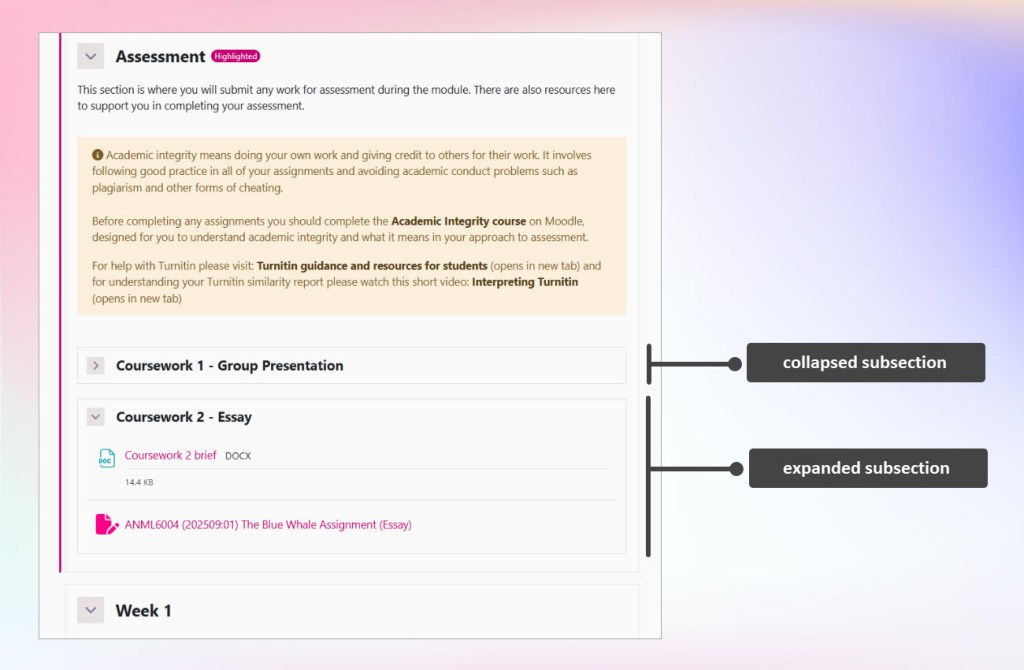
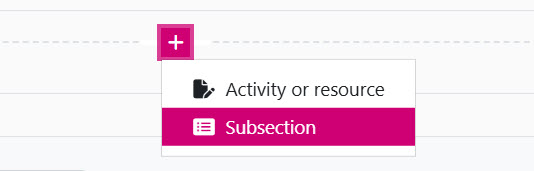
Subsections can be added directly to your course page:
- Turn editing on.
- Click the ‘Add content’ plus (+) icon and select Subsection.
Subsections function much like standard sections: you can add activities and resources using the activity chooser. You can easily drag and drop content into and out of subsections.
To work effectively Subsections:
should be used sparingly.
should be clearly labelled.
To ease navigation, don’t intersperse section activities and resources in between subsections; instead place all main section content above or below the subsections.
Pros
Improved course structure
Organize content more clearly within sections.
Better learner focus
Grouped materials reduce scrolling and distraction.
Collapsible layout
Helps reduce long pages.
Caution
Added complexity
Extra hierarchy may confuse new teachers or students.
Overuse
If overused, subsections can make it harder for students to quickly find content.
Potential navigation issues
Students might overlook content if subsection headings are unclear.
For more ideas on how to organise content see: Streamlining your course in Moodle