
Marks and feedback for each assessment, except the final assessment, can be released once marking and moderation is completed. All marks are provisional until marks have been confirmed by the Subject Examination Committee, therefore in the Coursework activity the column containing the mark is labelled ‘Provisional grade’.
All finalised and agreed marks for all assessments will be released to students in the Student Record System and not in Moodle. Please check with your Subject Coordinator or Programme Lead for more details on when to release provisional marks and feedback for your final assessment.
Option 1: For timed release of grades and feedback
You may not wish to release the grades/feedback to students now but instead may wish to release them at a particular date and time in the future.
To change the individual feedback release date:
- Go to the assessment dropbox.
- Click Settings.
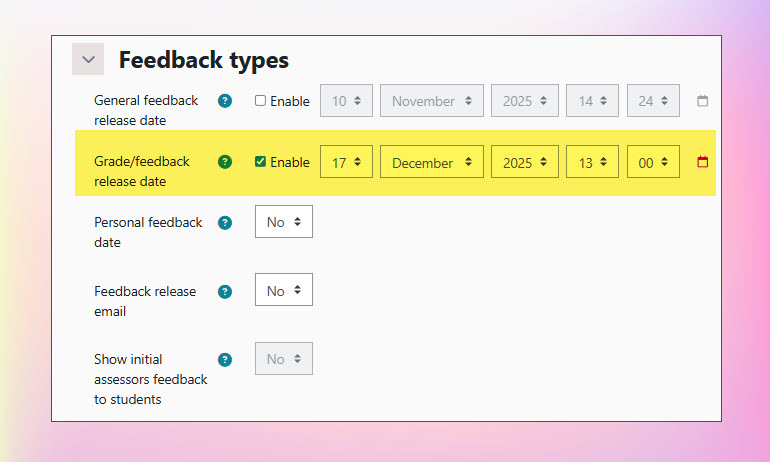
- In the ‘Feedback types’ section change the ‘Grade/feedback release date‘ to the date that you want the marks and feedback to be released to students:
- Scroll to the bottom of the Settings page and click ‘Save and display‘ to return to the main page of the Coursework activity.
Now configured, the ‘Grade/feeback release date’ will determine when marks and feedback are released to students in Turnitin. On reaching this date/time, the ‘Status’ column will change to ‘Released to students‘ and grades will immediately be available to students within the Coursework interface
Using Turnitin?
1. If your Coursework activity has both Turnitin and Blind marking enabled, you will need to ensure that student identities are revealed to allow students to access their feedback in Feedback Studio.
2. Sometimes there can be a slight delay of a few minutes after the ‘Grade/feedback release date’ has been reached before students can view their grades and feedback via Feedback Studio.
Option 2: For immediate release of grades and feedback
To make grades/feedback immediately available to students, repeat the steps as outlined in Option 1 (above) but set the ‘Grade/feedback release date’ (step 3) so that the date/time has already been reached.
Again, if Turnitin is enabled and student identities are still hidden, you will also need to reveal identities in order for students to view their grades/feedback via Feedback Studio.
The ‘Release all grades’ button
Whilst we recommend following the guidance above to release grades/feedback to students, a button labelled ‘Release all grades’, located beneath the list of submissions, will override the ‘Grade/feedback release date’ setting; this will release grades and feedback immediately but only for Coursework activities where Turnitin is not enabled (if Turnitin is enabled, please follow the guidance above).
If you do click the ‘Release all grades’ button, you will also need to reveal identities if student names are still hidden in the dropbox.