
Once you see the assessment submission dropbox(es) in your module in Moodle, go to the Settings page of each ‘Coursework’ activity and amend the availability for your assessment. All assessment submission dropboxes for Semester 1 2026 have been deployed with the same deadline for submissions (21 September 2026 at 1pm).
What do I need to do?
Go to the ‘Settings’ page of your Coursework activity navigate to ‘Availability’:
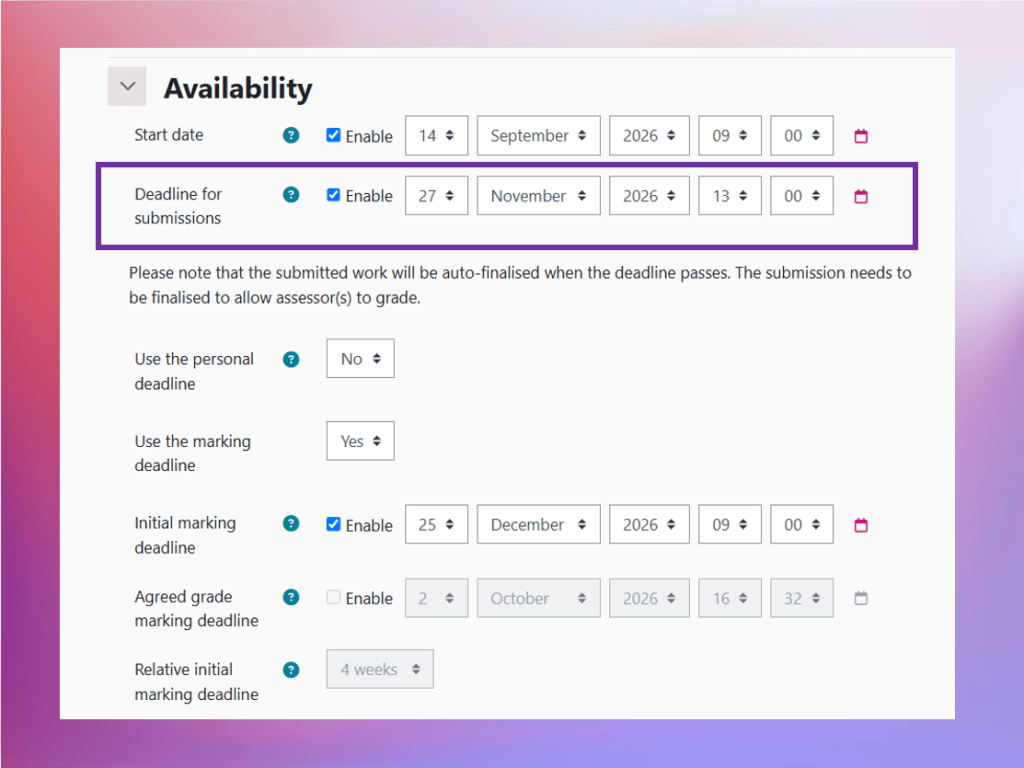
- Start date is currently set to 14 September 2026
- This is the date from when your students will be able to start submitting their work.
- You can amend this date as appropriate.
- Deadline for submissions must be amended
- Change date and time to the correct deadline.
- This is the date after which students won’t be able to submit work.
- Note: students with extensions will have their own deadline (i.e. 1 week after the deadline for all submissions).
After you amend the deadline for submission:
- ISP extensions will be applied to the dropbox.
- all submissions before the deadline date will be displayed as ‘on time’.
- you can go through and delete the ‘Not Attempted’ flags from the Grade Reason column if desired. Please note this is an optional step as the system will ignore the ‘Not Attempted’ grade reason flag if the student’s work is submitted on time.