
The ‘Resubmit to Turnitin‘ error message usually indicates that there is an issue with the student’s submission that has prevented it from being sent successfully to Turnitin. As a result, the submission has failed.
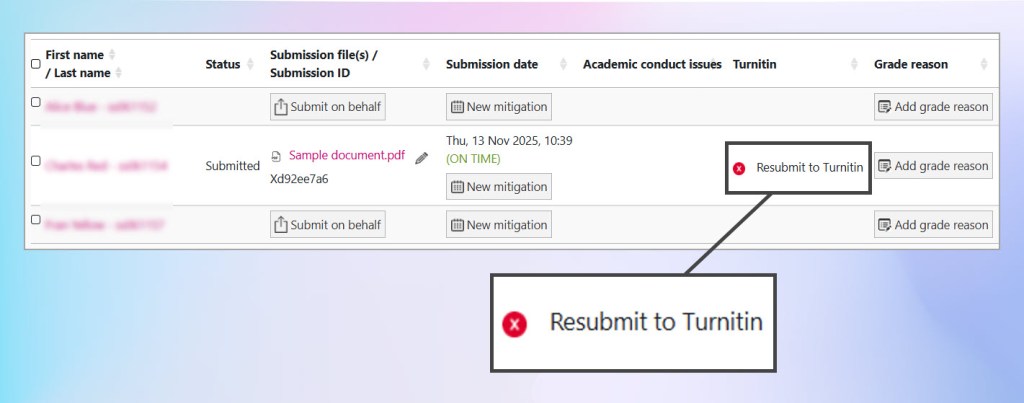
There are several possible reasons why this might occur:
- Incorrect file format: For example, the student has uploaded a Pages file or a Google Doc that hasn’t been properly converted to a Word or PDF document.
- Insufficient word count: Turnitin requires a minimum of twenty words for a submission.
- File size too large: The document exceeds the upload limit.
If you hover your mouse over the red x symbol a yellow tooltip will appear explaining the likely cause of the failure.
Your submission must contain twenty words or more
Unfortunately the submission is not recoverable as the submission process has failed, and the file will need to be deleted and resubmitted. If your Coursework activity has blind marking enabled, student names will appear as ‘hidden’. Therefore, in order to identify a student’s submission and unfinalise their submission you will need to first switch into a role that has permission to view students’ names temporarily.
In order to identify the student names:
- Go to the Coursework dropbox.
- Click your initials or profile photo from the top right corner of Moodle.
- Click Switch role to…
- In ‘Switch role to..’ scroll to the bottom of the list and choose Coursework Un-Mask Names.
- This will allow you to temporarily reveal student identities so that you can make a note of the submission ID. You can not change or edit the activity settings, nor can you change or edit marks and feedback with this role.
- To return to your normal role, click your initials or profile photo from the top right corner of Moodle. (Note: the type of role you have temporarily switched into will appear in this corner as well in this case ‘Coursework Un-Mask Names’.)
- Click Return to my normal role and unfinalise the submission.
Please contact the student to explain the issue and ask them to resubmit in the correct format. You can direct them to the following guidance:
- How do I convert or save my Word, Pages or Google Doc document as a PDF?
- How can I resubmit to a Coursework dropbox (coming soon)